
You are using an out of date browser. It may not display this or other websites correctly.
You should upgrade or use an alternative browser.
You should upgrade or use an alternative browser.
The 3D Printing Thread
- Thread starter rcubed
- Start date
More options
Who Replied?
Lutter
strong butthole 💪
The new Creality K2 is in the same class as the Bambu X1C (but is not a beginner machine) but I think the A1 or A1 mini are both perfect for beginners. Very easy to work on and switch out parts. Good sale right now tooanything wrong with Creality for a first-timer who will absolutely nerd out on the details and minutiae?
or is Bambu recommended for entry level?
any real differences?
I do not recommend any other Creality printers after using an Ender years ago. They’re really slow (2x slower than an A1 at least) and don’t have automatic leveling so you have to level before every print manually…. It’s a pain in the butt.

furley
Super Sports Nerd
these appear to be standalone machines but i'm assuming to get started you need filament, nozzles, etc.The new Creality K2 is in the same class as the Bambu X1C (but is not a beginner machine) but I think the A1 or A1 mini are both perfect for beginners. Very easy to work on and switch out parts. Good sale right now too
I do not recommend any other Creality printers after using an Ender years ago. They’re really slow (2x slower than an A1 at least) and don’t have automatic leveling so you have to level before every print manually…. It’s a pain in the butt.
is there a basic starter kit you would recommend? things you would want out of the box that aren't included so i'm not handing over a gift with a requirement to spend another $400 on the necessary materials just to tinker with the first time. rather just knock it all out up front and present a fully usable present.
Lutter
strong butthole 💪
Bambu actually has all the stuff you need in the box and some replacements as well. A1 came with a 0.4mm nozzle, 2 replacement filament cutters, a blade to use in a bed scraper you can print, oil, lubricant, and screwdrivers for assembly/repairs that actually don't suck. Probably like 4 other things I forgot to.these appear to be standalone machines but i'm assuming to get started you need filament, nozzles, etc.
is there a basic starter kit you would recommend? things you would want out of the box that aren't included so i'm not handing over a gift with a requirement to spend another $400 on the necessary materials just to tinker with the first time. rather just knock it all out up front and present a fully usable present.
If you just add filament you should be good.
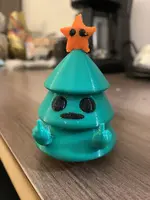
I recommend the combo (available with both A1/mini). It saves a lot of time because it automatically purges, cuts, and feeds your filament. You also can't really do prints with more than 1 color without finding files where the pieces are separated. For instance what I printed above is 3 colors (green, black, orange) that the AMS Lite combo automatically changed between filaments (60 times, iirc, if you did it manually) to create that model.

Lutter
strong butthole 💪
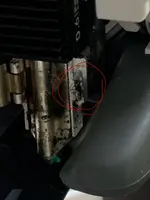
Yeah I had a crash that pissed me off on a big print I was setting up.These recent Bambu Lab updates to 1.10 and 1.10.1 as of this morning has unfortunately been crashing occasionally for me.
Single plates seem fine though.
Lutter
strong butthole 💪
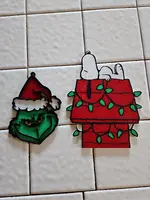
Whilest out of commission for a few days waiting for my new hotend chasis (which aren't expensive btw... it was $20, their shipping is just slow) I decided to try out one of these ICE build plates on a project.

 darkmoon3d.com
Apparently you can print PLA or PETG with zero heat (or less heat to increase adhesion for thin items) and it doesn't need to be cleaned with soap.

Darkmoon ICE Build Plate for Bambu Lab Printers
Miss your Bambu Lab Cool plate? Upgrade to Darkmoon ICE - the superior alternative for Bambu Lab printers. Print PLA, PETG, ABS, ASA at room temperature with unmatched adhesion and warp-free results.
darkmoon3d.com
Apparently you can print PLA or PETG with zero heat (or less heat to increase adhesion for thin items) and it doesn't need to be cleaned with soap.
Lutter
strong butthole 💪
Holy crap this looks amazing at $1199 (or $949 as a kit).
A shame that their multi-color device (MMU3) is kinda rudimentary and takes up a lot of space but they will likely upgrade that later.
Very competitive entry from the EU though. I think this is the first ever consumer-level enclosed Prusa printer (they've sold enclosures but never combined the two peanut butter jelly style).
Holy crap this looks amazing at $1199 (or $949 as a kit).
A shame that their multi-color device (MMU3) is kinda rudimentary and takes up a lot of space but they will likely upgrade that later.
Very competitive entry from the EU though. I think this is the first ever consumer-level enclosed Prusa printer (they've sold enclosures but never combined the two peanut butter jelly style).
Bambu has been great at getting them to step it up.
Lutter
strong butthole 💪
Seeing these guys in the Czech Republic actually being able to compete with the cheap labor of China really gives me a lot of hope that someone will eventually step up a competitor domestically. I looked into that once and everything is twice the price and basically a Prusa MK3 clone at the moment (without the reliability)Bambu has been great at getting them to step it up.
Bambu just released their PLA wood series: https://store.bambulab.com/products...EFQT&sc_llid=187521&sc_customer=6700678119560
We have the MK3 and Mini at work and they have been workhorses for us. Unfortunately the Bambu is much faster.Seeing these guys in the Czech Republic actually being able to compete with the cheap labor of China really gives me a lot of hope that someone will eventually step up a competitor domestically. I looked into that once and everything is twice the price and basically a Prusa MK3 clone at the moment (without the reliability)
Lutter
strong butthole 💪
Ugh I wish this was out last week so I could have added it to my last order. I have a lot of tiny Christmas trees to make in the next month.Bambu just released their PLA wood series: https://store.bambulab.com/products...EFQT&sc_llid=187521&sc_customer=6700678119560
 It's really cool they have multiple variants of wood color.
Did pick up their PLA Cobalt Metal last week to use for my Star Wars droid project. Interested to see if it's good (Bambu filaments are usually pretty good but I'm a cheap bastard so I usually buy Elegoo or Sunlu).

Lutter
strong butthole 💪
Do those lines exist when you slice the model? I ask because they're all the same place:Forgot to post this, all Bambu PLA Silk.
While I'm very happy with the results, I need to play around with slowing down the print speed to get them to pop more.
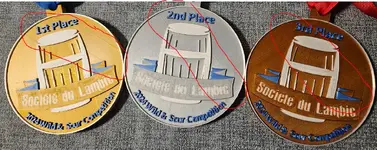
It might just be that you need to adjust variable layer height or the top design to get rid of them. Checking the "ironing" option and adding walls to the top surface also seems to help (I do 5 walls and 5 top/bottom layers on all my stuff... it doesn't actually add a ton of print time).
LOL if they're supposed to be there I'm completely off track and have lost the narrative apparently.
I do tend to slow down anything with text/detail on top to 50%/Silent towards the end of the print. Slow with PETG means being practically indestructible (versus something very shattery) so if it's something I know will take a beating I always print it at 50%.
Lutter
strong butthole 💪
New hardware came in…
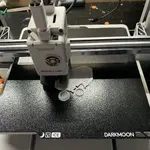
Trying a print with 0 hotbed temp with some PLA.
My biggest thing is that the additives they’ve added to this board to give it the properties of retaining adhesion also make it so you don’t need to use soap between every few prints. That’s going to be HUGE for me since I use mostly PETG.
This thing rules. I saw they had a discord and I can report that Ben, the who makes these in Oklahoma is literally on there answering questions.
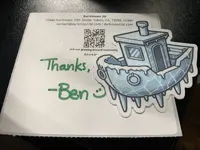
My first US-made hardware and he put a note and the cutest ICE Benchy sticker in the box.
Trying a print with 0 hotbed temp with some PLA.
My biggest thing is that the additives they’ve added to this board to give it the properties of retaining adhesion also make it so you don’t need to use soap between every few prints. That’s going to be HUGE for me since I use mostly PETG.
This thing rules. I saw they had a discord and I can report that Ben, the who makes these in Oklahoma is literally on there answering questions.
My first US-made hardware and he put a note and the cutest ICE Benchy sticker in the box.